Traffic Generation
The traffic generation tool (Trafficker) generates and executes network traffic patterns in dockerized O-RAN deployments. It reads a YAML configuration file that defines which UEs send or receive traffic, what patterns to use, and how the traffic is distributed over time. The generated traffic plan is discretized into time slots and executed in the running deployment. It works with the dockerized deployment of the configurator in this repository as well as the NIST O-RAN testbed.
Getting Started
Prerequisites
- A running O-RAN deployment (using configurator or NIST testbed)
- Connected UEs
- Python 3 with
numpy,matplotlib, andpyyaml
Running the Trafficker
Running the trafficker can be done by running the ./run_trafficker.sh and passing the desired arguments.
Alternatively, one can execute the trafficker directly:
# Run with the default sample config
python src/trafficker.py

# Run with a custom config
python src/trafficker.py --config path/to/my_traffic.yaml

# Preview traffic visually, then execute
python src/trafficker.py --config my_traffic.yaml --plot

# Only plot, do not execute
python src/trafficker.py --config my_traffic.yaml --plot --no-exec
ℹ️ The parameters given to the python script (like the ones above) can also be passed to the
./run_trafficker.shscript.
CLI Options
| Flag | Default | Description |
|---|---|---|
--config | config/sample_traffic.yaml | Path to the traffic YAML configuration file |
--plot | off | Show a matplotlib plot of the traffic plan before execution. Execution only starts once the plot is closed. |
--no-exec | off | Skip execution (useful with --plot for preview only) |
--time-unit | m | Time axis unit for the plot: ms, s, m, or h |
Visualizing the Traffic to Generate
Using the --plot flag is an easy way to visualize the traffic that is going to be generated.
It shows the amount of traffic by the individual UEs over time as well as the cumulative traffic to / from the core.
The plot() method in the trafficker.py script provides more granular control over the elements that are displayed,
like only showing the cumulative traffic in the system.
The following plot shows an example of all the possibilities of traffic generation. It combines overlapped (random and periodic) traffic in the first part with traffic following different distributions in the second part. You can find an overview over all the possibilites of generation in the Traffic Patterns section below.
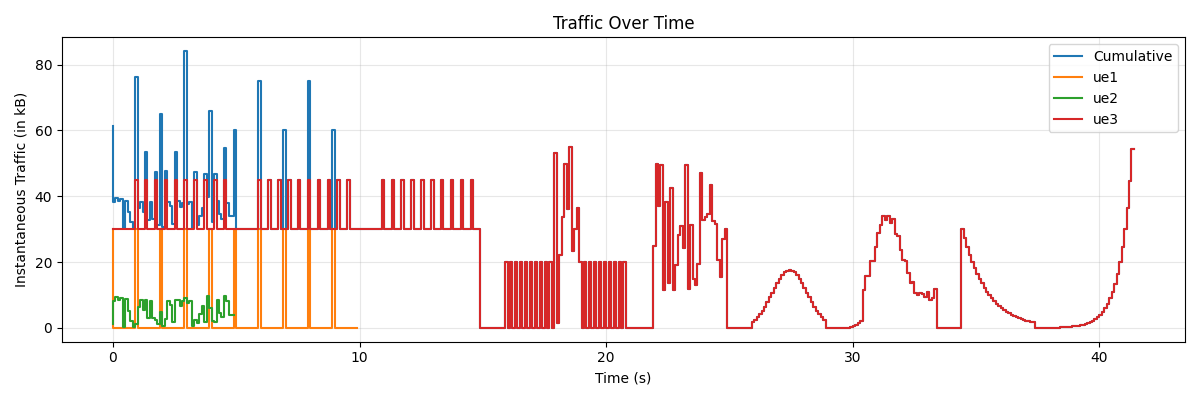
⚠️ Note: Close the plot window to continue execution; otherwise, no new traffic samples will be generated.
Writing Your First Config
A traffic config has two sections: parameters (global settings) and traffic (per-UE patterns).
parameters:
  core:
    service: 5gc
    address: 10.45.1.1
  user-equipments:
    ue1:
      service: ue1
      address: 10.45.1.2
  direction: DL
  workdir: ../repositories/
  granularity: 100ms

traffic:
  ue1:
    - periodic:
        size: 30kB
        interval: 1s
        duration: 10s
This sends a 30 kB packet every second for 10 seconds from the core to ue1 (downlink).
More information about the parameters and traffic patterns is available in the Reference section below.
Units
Values throughout the config accept human-readable units:
| Category | Supported Units |
|---|---|
| Time | ms, s, m, h |
| Size | B, kB, MB, GB |
Decimal values are supported (e.g. 1.5s, 2.5kB).
Reference
Parameters
The parameters section configures the deployment topology and execution behaviour.
parameters:
  core:
    service: <string>       # Docker service name of the 5G Core
    address: <string>       # IP address of the Core in the deployment
  user-equipments:
    <ue_id>: # Arbitrary identifier, must match a key in the traffic section
      service: <string>     # Docker service name of this UE
      address: <string>     # IP address of this UE
  direction: <DL|UL|BI>     # Traffic direction
  workdir: <path>           # Directory containing the docker-compose file
  granularity: <time>       # Time resolution for traffic slots (default: 100ms)
  loop: <bool>              # Repeat the traffic pattern forever (default: false)
  use_nist: <bool>          # Use NIST O-RAN testbed instead of Docker (default: false)
  nist_vm_ssh: <string>     # SSH connection string for NIST VM, or 'local' (only needed if use_nist is true)
  use_udp: <bool>           # Use UDP instead of TCP (default: false)
Direction
| Value | Meaning |
|---|---|
DL | Downlink — Core sends to UEs. One sender at the Core per UE, one receiver per UE. |
UL | Uplink — UEs send to Core. One sender per UE, a single shared receiver at the Core. |
BI | Bidirectional — Not currently supported for socket handlers. Use the Ping handler for bidirectional ICMP traffic. |
Granularity
The granularity defines the time resolution of the traffic plan. Traffic is discretized into slots of this length. Each slot specifies how many bytes to send during that interval.
Lower granularity means finer control but more overhead. Values below 100ms are typically not sensible since they
approach the RTT between UE and gNB.
UDP Limitations
When use_udp: true, each packet is limited to 65 kB (the UDP datagram size limit). One packet is sent per time slot
per UE, so the effective maximum throughput per UE is 65 kB / granularity.
Traffic Patterns
The traffic section maps each UE ID to a list of traffic patterns. Patterns in the list are executed **sequentially
** (one after another). Every UE listed here must also be defined in user-equipments.
traffic:
  <ue_id>:
    - <pattern>
    - <pattern>
    - ...
periodic
Sends a fixed-size packet at regular intervals.
- periodic:
    size: 30kB          # Packet size
    interval: 1s        # Time between packets
    duration: 10s       # Total duration
    offset: 0ms         # (Optional) Start delay when used inside an overlap
If the interval is smaller than the granularity, multiple packets may land in the same time slot and their sizes are summed.
random
Sends packets with uniformly random sizes each time slot.
- random:
    duration: 5s         # Total duration
    min_size: 0kB        # Minimum packet size
    max_size: 10kB       # Maximum packet size
    offset: 0ms          # (Optional) Start delay when used inside an overlap
One random packet is generated per time slot.
pause
Inserts a gap with zero traffic.
- pause: 1s
distribution
Distributes a total number of bytes across the duration according to a statistical distribution. The sum of all slot
values equals cumulative_size.
- distribution:
    type: <distribution-type>
    duration: 3s
    cumulative_size: 300kB
    # ... distribution-specific parameters
Distribution Types
normal-distribution
Bell curve centered at mean (as a fraction of the duration).
| Parameter | Default | Description |
|---|---|---|
mean | 0.5 | Center of the bell curve as a fraction of the duration (0.0 = start, 1.0 = end) |
variance | auto | Variance of the distribution. If omitted, set so 99.7% of traffic falls within the duration (std = num_slots / 6). |
- distribution:
    type: normal-distribution
    duration: 3s
    cumulative_size: 300kB
    mean: 0.5
    variance: 50
uniform-distribution
Spreads traffic evenly across all time slots.
No additional parameters.
- distribution:
    type: uniform-distribution
    duration: 3s
    cumulative_size: 300kB
exponential-distribution
Exponential growth or decay across the duration.
| Parameter | Default | Description |
|---|---|---|
lambda | 3.0 / num_slots | Rate parameter. Higher values produce steeper curves. |
reverse | false | If true, traffic decays instead of growing (or vice versa). |
- distribution:
    type: exponential-distribution
    duration: 3s
    cumulative_size: 300kB
    lambda: 0.2
    reverse: true
overlap
Runs multiple patterns simultaneously, adding their traffic together slot by slot. Each sub-pattern can have an
offset to delay its start.
- overlap:
    - periodic:
        size: 20kB
        interval: 200ms
        duration: 5s
    - random:
        offset: 2s
        duration: 1s
        min_size: 0kB
        max_size: 40kB
When nesting overlaps, the offset for the inner overlap is specified as a standalone list item:
- overlap:
    - distribution:
        type: normal-distribution
        duration: 3s
        cumulative_size: 300kB
    - overlap:
        - offset: 500ms
        - distribution:
            type: uniform-distribution
            duration: 3s
            cumulative_size: 300kB
        - random:
            duration: 3s
            min_size: -2kB
            max_size: 2kB
loop
Repeats a sequence of patterns a given number of times.
- loop:
    iterations: 3
    elements:
      - periodic:
          size: 30kB
          interval: 100ms
          duration: 5s
      - pause: 1s
The elements list is treated as a sequence — patterns run one after another, and the whole sequence repeats
iterations times.
Composing Patterns
Patterns can be freely nested and combined:
- Sequential: List multiple patterns under a UE — they run back-to-back.
- Parallel: Use
overlapto layer patterns on top of each other with optional offsets. - Repeated: Use
loopto repeat any sequence of patterns. - Nested:
overlapandloopcan contain any pattern type, including each other.
Traffic Handlers
The Trafficker uses pluggable handler pairs (sender + receiver) for actual data transmission. The handler is selected in code, not in the YAML config.
PySocket (default)
Persistent Python socket connections. A sender script runs inside the container and reads packet sizes from stdin, sending random data of that size. The receiver runs a Python socket server.
- Lowest overhead (persistent connection, no per-packet process spawning)
- Supports TCP and UDP
- Most stable and accurate handler
- Preferred for most use cases
Netcat
Uses the nc command-line tool. Each packet spawns a new netcat process with data piped from /dev/urandom.
- Higher overhead than PySocket (new process per packet)
- Supports TCP and UDP
- Useful as a fallback when Python is not available in the container
Ping
ICMP echo requests using the ping command. No explicit receiver needed — the kernel handles replies.
- Bidirectional by nature (echo request + reply)
- Limited to 65 kB payload per packet
- Useful for basic connectivity testing and bidirectional traffic
Execution Model
- Parse — The YAML config is parsed into traffic config objects.
- Generate — The plan generator converts configs into NumPy arrays of bytes-per-slot, one array per UE.
- Plot (optional) — Matplotlib renders the traffic plan as a step plot (instantaneous kB per slot over time).
- Execute — The executor sets up sender/receiver pairs for each UE based on the direction, then iterates through the traffic arrays slot by slot. Each slot, all UE senders fire in parallel using a thread pool. After sending, the executor sleeps for the remainder of the granularity interval to maintain timing.
If loop is enabled in parameters, the entire plan restarts after completing.